When businesses connect their website with a CRM, WordPress + Salesforce integration is one of the most widely used and powerful combinations. It helps organisations capture leads, synchronise data, automate follow-ups, and give sales teams real-time visibility into customer interactions.
However, during this integration process, one important question almost always comes up:
Should we use Salesforce configuration or Salesforce customization?
This confusion is very common, especially among business owners, marketers, and decision-makers who are not deeply technical. Many assume both terms mean the same thing, while others believe customization is always better.
In reality, both configuration and customization play important roles, especially when integrating WordPress with Salesforce.
This blog explains the difference in simple, practical language, with a clear focus on how each approach affects WordPress and Salesforce integration decisions.
Understanding the Basics First
Before connecting WordPress to Salesforce, it is important to understand how Salesforce can be adjusted to match different business needs.
Salesforce is not a rigid system. It is designed to be flexible, allowing businesses to shape it according to their processes. There are two main ways to do this:
- Configuration – Using built-in tools, settings, and features
- Customization – Writing code to build advanced or unique functionality
Both approaches are useful. The key difference lies in complexity, cost, flexibility, and long-term maintenance.
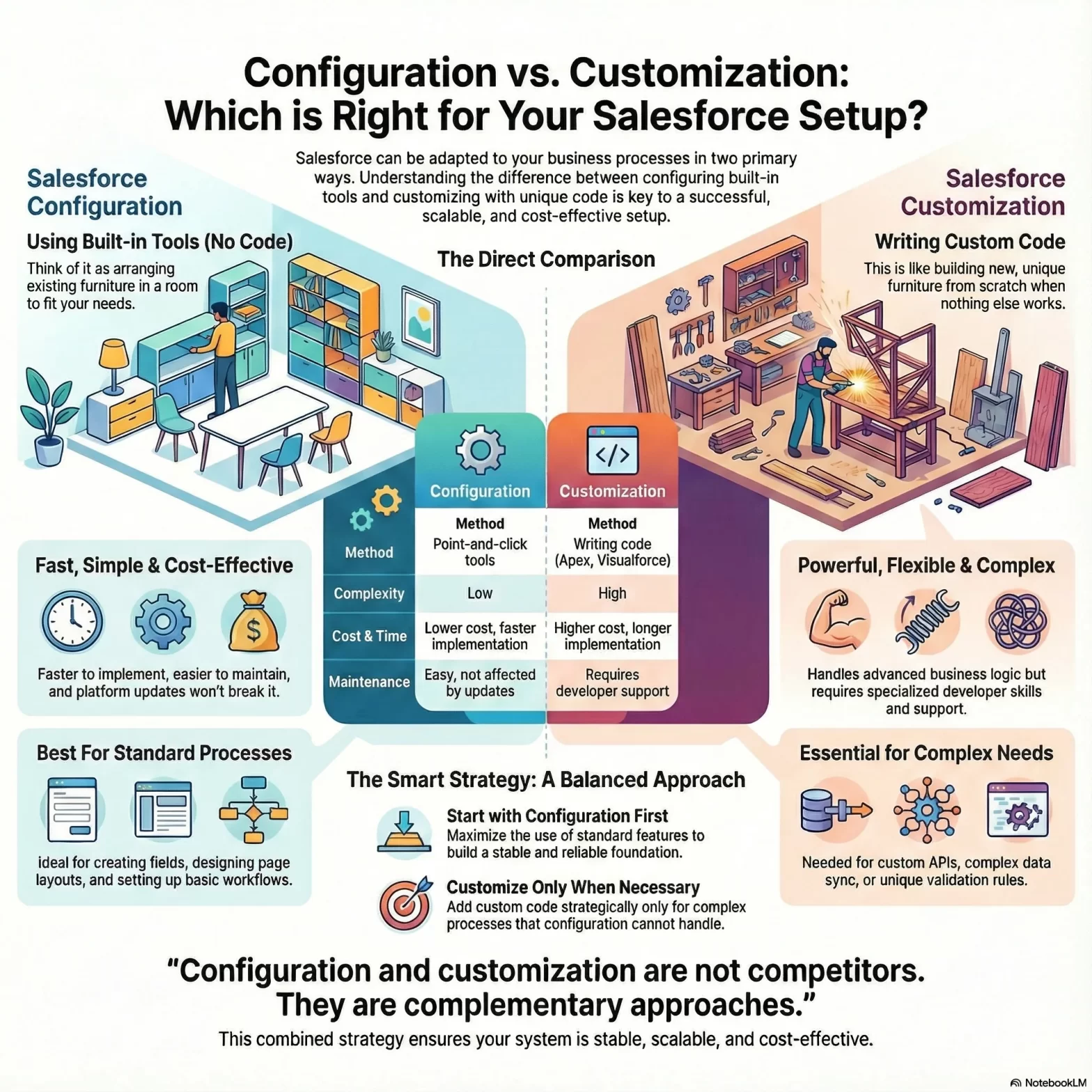
What Is Salesforce Configuration?
Salesforce configuration means setting up Salesforce using existing features, without writing any code.
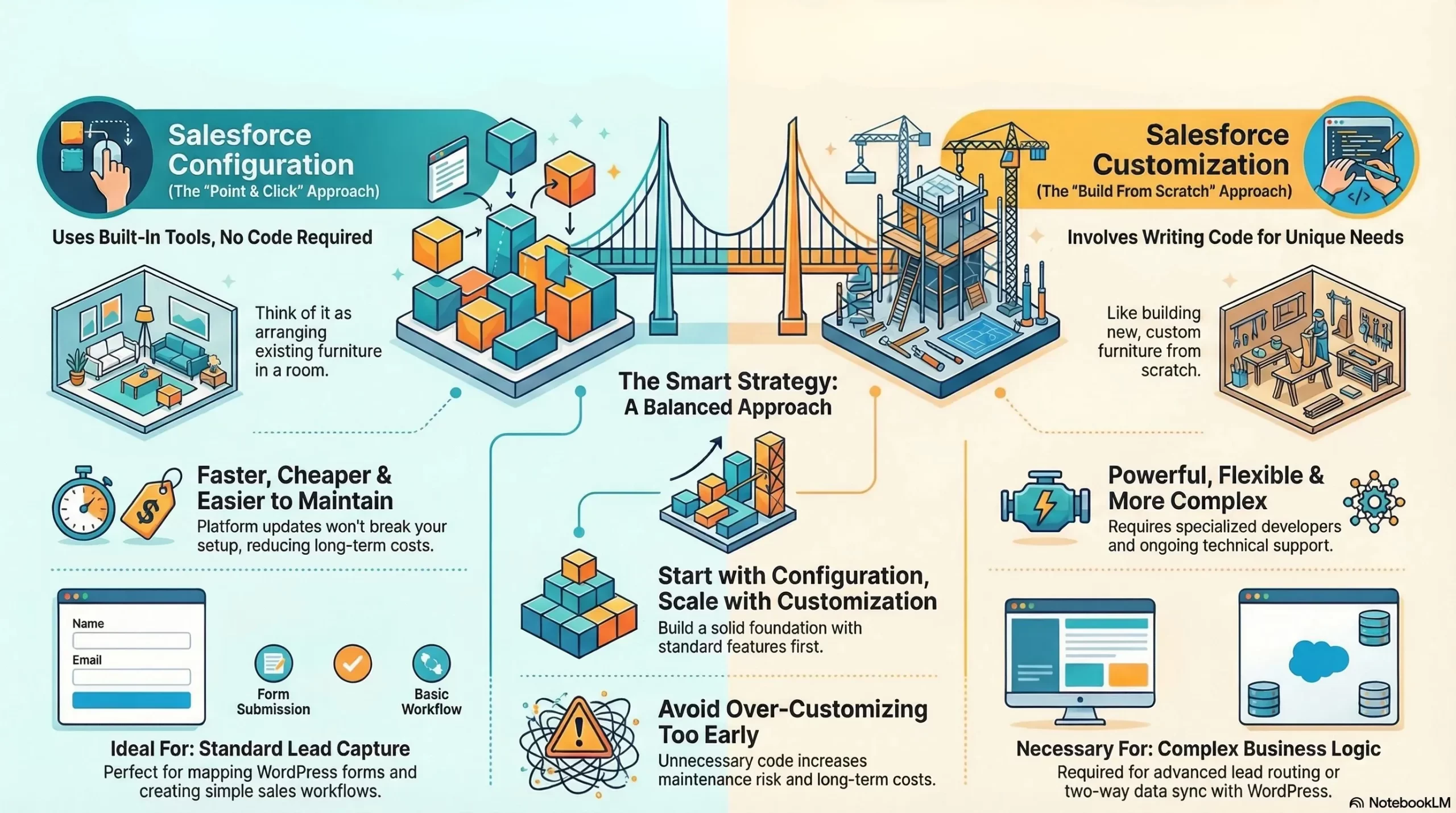
A simple way to understand configuration is to think of it like arranging furniture in a room. The furniture already exists; you are simply placing it where it makes the most sense.
Common Salesforce Configuration Examples
Salesforce configuration includes tasks such as:
- Creating custom fields like Name, Email, Phone, and Lead Source
- Designing page layouts for leads, contacts, and opportunities
- Setting up workflows, validation rules, and approval processes
- Creating reports and dashboards for sales and marketing teams
- Managing user roles, permissions, and access levels
All of this can be done using Salesforce’s interface, without touching code.
Configuration in WordPress + Salesforce Integration
When integrating WordPress with Salesforce, configuration is often the first and most important step.
Typical configuration-based integration tasks include:
- Mapping WordPress form fields to Salesforce lead fields
- Assigning incoming leads to the correct sales team or queue
- Setting default lead sources such as “Website”, “Contact Form”, or “Campaign Page”
- Sending automatic email alerts when a form is submitted
- Creating basic lead follow-up workflows
For many businesses, this level of setup already delivers significant value.
Why Salesforce Configuration Is Popular?
Salesforce configuration is widely used because it offers several clear benefits:
- No coding required
- Faster implementation timelines
- Easier to manage and update
- Salesforce platform updates do not break configurations
- Lower overall cost compared to customization
For most small and mid-sized websites, configuration alone is sufficient to handle lead capture, assignment, and basic automation from WordPress.
What Is Salesforce Customization?
Salesforce customization involves writing code to build features or logic that Salesforce does not provide out of the box.
Customization is required when a business has complex processes that cannot be handled using standard settings and workflows.
Instead of arranging existing furniture, customization is like building new furniture from scratch.
Common Salesforce Customization Examples
Salesforce customization may include:
- Custom Apex classes for advanced business logic
- Custom Lightning or Visualforce components
- Advanced validation rules beyond standard capabilities
- Custom APIs for data exchange
- Complex data synchronisation rules across systems
These solutions are powerful, but they require experienced developers and ongoing technical support.
Customization in WordPress + Salesforce Integration
Customization is usually required in WordPress and Salesforce integration when the data flow or logic becomes complex.
Common scenarios include:
- Multiple WordPress forms with different business rules
- Advanced lead routing based on behaviour, geography, or services
- Sending data from Salesforce back to WordPress
- Synchronising custom Salesforce objects with website data
- Integrating Salesforce with additional external systems
For example, if your WordPress website offers multiple services and each form submission needs a different Salesforce workflow, customization becomes necessary.
Salesforce Configuration vs Customization: A Simple Comparison
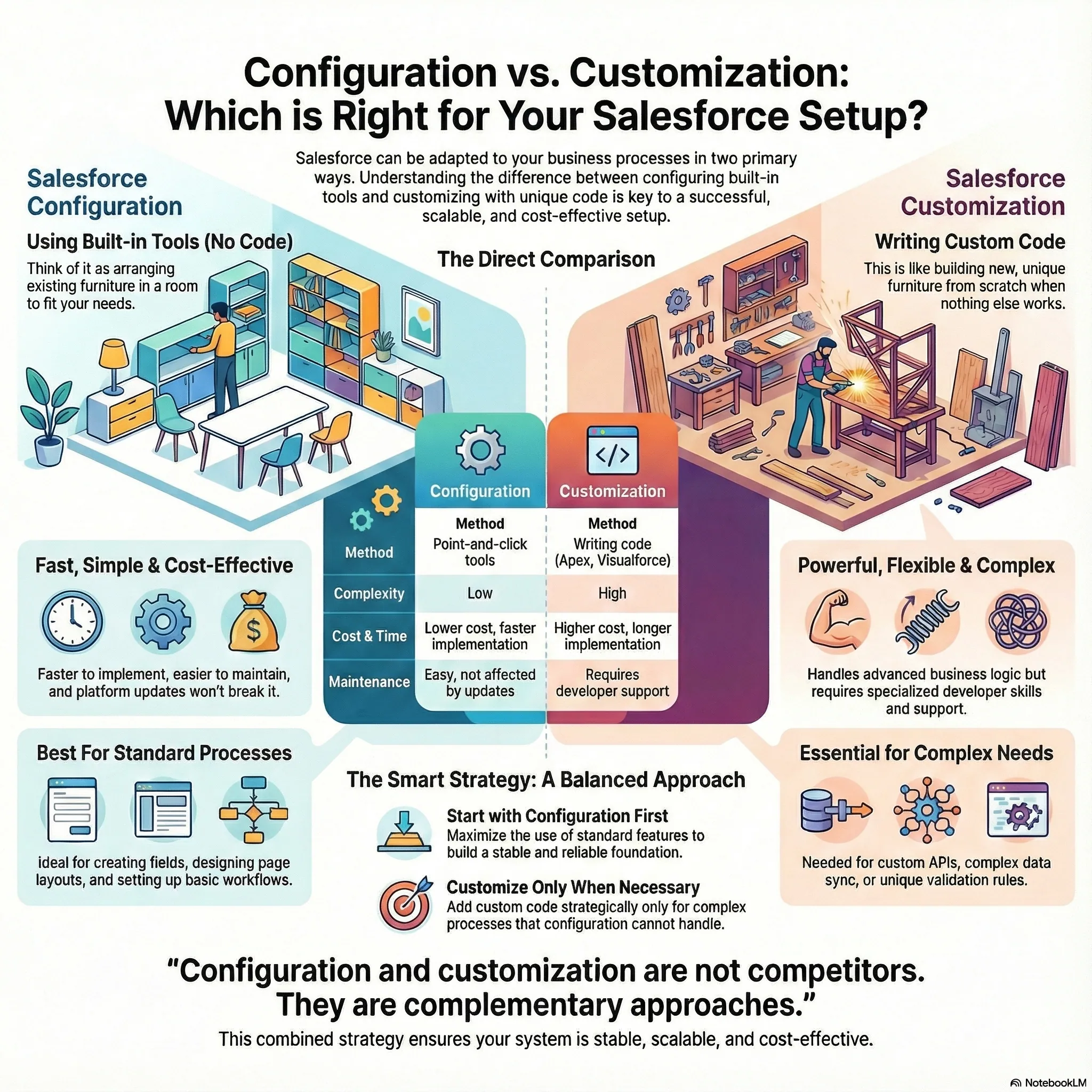
This comparison highlights why configuration is often preferred initially, while customization is introduced only when required.
Which One Is Better for WordPress + Salesforce Integration?
There is no universal answer. The right choice depends entirely on your business goals and process complexity.
Choose Salesforce Configuration If:
- You want to capture leads from WordPress forms
- Your sales and follow-up process is straightforward
- You want quick deployment
- You prefer lower costs and simpler maintenance
- You want flexibility without technical dependency
Most small and mid-sized businesses fall into this category and benefit greatly from configuration-based integration.
Choose Salesforce Customization If:
- Your lead flow involves complex conditions
- You need custom assignment, scoring, or validation logic
- Data must move both ways between WordPress and Salesforce
- You use custom Salesforce objects extensively
- You plan to scale automation across multiple systems
Many growing organisations start with configuration and later adopt customization as their operations mature.
Best Practice: Use Configuration and Customization Together
In real-world projects, the most effective approach is often a balanced combination of configuration and customization.
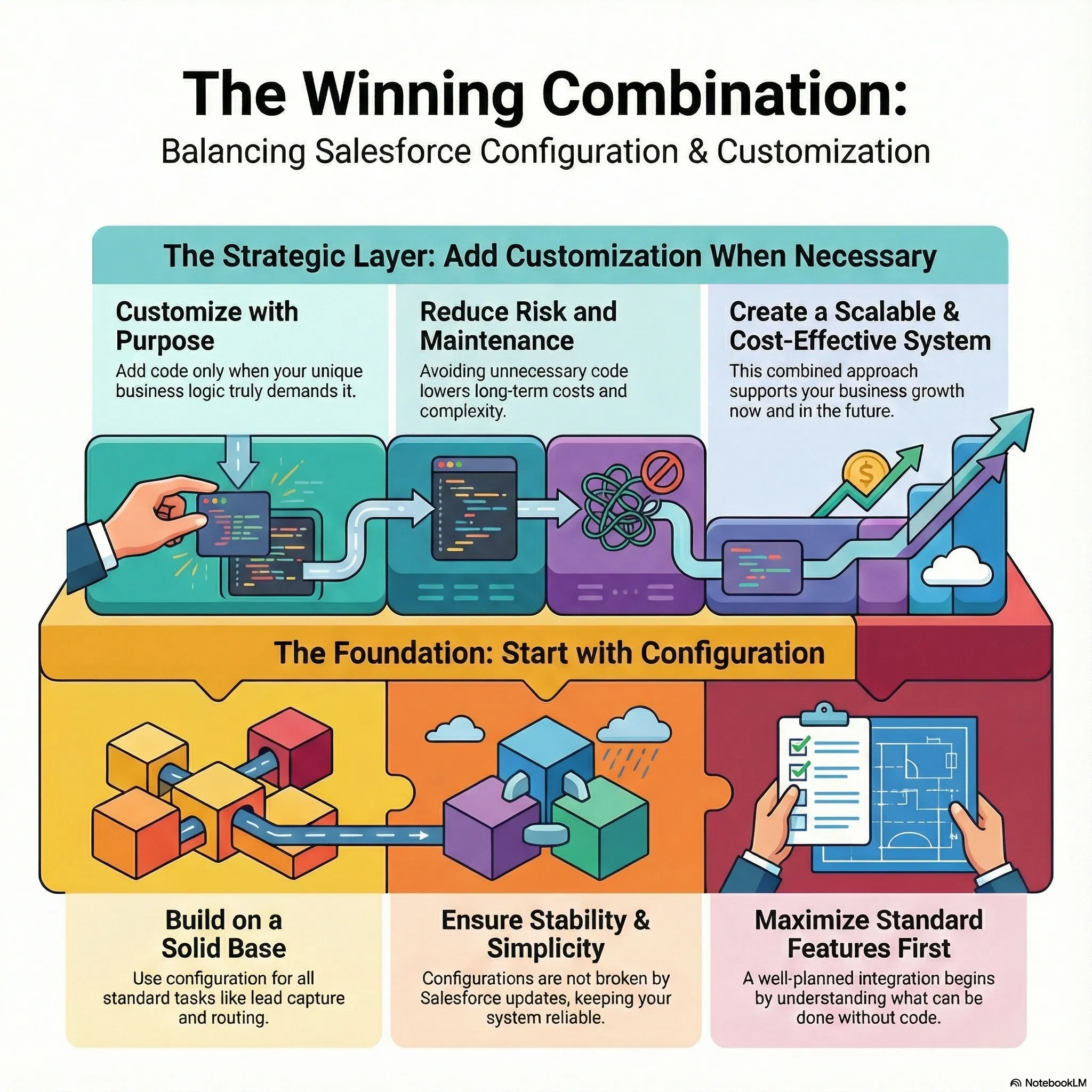
How This Works in Practice
- Use configuration for standard lead capture and routing
- Add customization only where business logic demands it
- Keep Salesforce flexible for future updates and changes
- Avoid unnecessary code that increases maintenance risk
This strategy ensures your integration remains stable, scalable, and cost-effective over time.
Common Mistakes to Avoid
When planning WordPress and Salesforce integration, businesses often make avoidable mistakes, such as:
- Over-customizing too early
- Ignoring standard Salesforce features
- Not planning for future scalability
- Relying solely on plugins without proper Salesforce setup
- Treating Salesforce as only a data storage tool
A well-planned integration always begins by understanding what can be achieved through configuration first.
Why Strategy Matters More Than Tools?
The success of WordPress and Salesforce integration does not depend solely on plugins, connectors, or code. It depends on strategy.
Key factors include:
- A clear understanding of the sales process
- Correct mapping of data fields
- Smart decisions between configuration and customization
- Automation that supports long-term growth
When implemented correctly, Salesforce becomes a central system of truth, connecting marketing, sales, and customer data seamlessly.
Final Perspective
Salesforce configuration and customization are not competitors. They are complementary approaches designed to solve different problems.
- Configuration delivers speed, simplicity, and reliability
- Customization provides flexibility, control, and advanced functionality
For WordPress and Salesforce integration, the smartest path is to start simple, build on configuration, and scale with customization when the business truly needs it.
We at Dotsquares can significantly simplify and strengthen your WordPress + Salesforce integration by handling the entire process from planning to deployment and beyond. With over two decades of experience and a team of certified experts, Dotsquares ensures that your website and Salesforce CRM communicate seamlessly, allowing form data from your WordPress site to flow directly into Salesforce in real time, enabling automated lead capture, personalised user experiences, and smarter sales tracking without manual intervention.
Whether you choose plugin-based integration for simpler setups or custom API solutions for advanced business logic, Dotsquares manages the technical complexity, safeguards data security, and provides ongoing support so you can focus on growth rather than backend challenges.
By making the right choices early, businesses can create an integration that not only works today but continues to support growth tomorrow.
Book a 30-minute Strategy Session with our Lead Salesforce Engineer. We will review your current infrastructure and outline a roadmap to integrate securely no sales pitch, just engineering strategy.

