Many growing businesses reach a familiar crossroads.
Your website is live, traffic is coming in, and enquiries are being generated—but follow-ups are inconsistent. Sales teams are juggling spreadsheets because the CRM is underused or poorly configured. Marketing campaigns are running, yet leadership cannot clearly see which efforts are driving real revenue.
That’s when the big question surfaces:
Should we build on WordPress or Salesforce?
It’s a fair question—but also the wrong framing.
The truth is this: WordPress and Salesforce are not competing platforms. They are designed for different responsibilities within the same growth system. Problems arise not because companies choose the wrong tool—but because they expect one tool to do everything.
This guide explains what WordPress really does well, what Salesforce truly excels at today (including its cloud ecosystem), where each platform fits best, and why combining them—properly—often delivers the strongest ROI.
What WordPress Is—and Why It Still Dominates the Web
WordPress is the world’s most widely used Content Management System (CMS). A CMS allows businesses to create, manage, and publish website content without rebuilding everything from scratch.
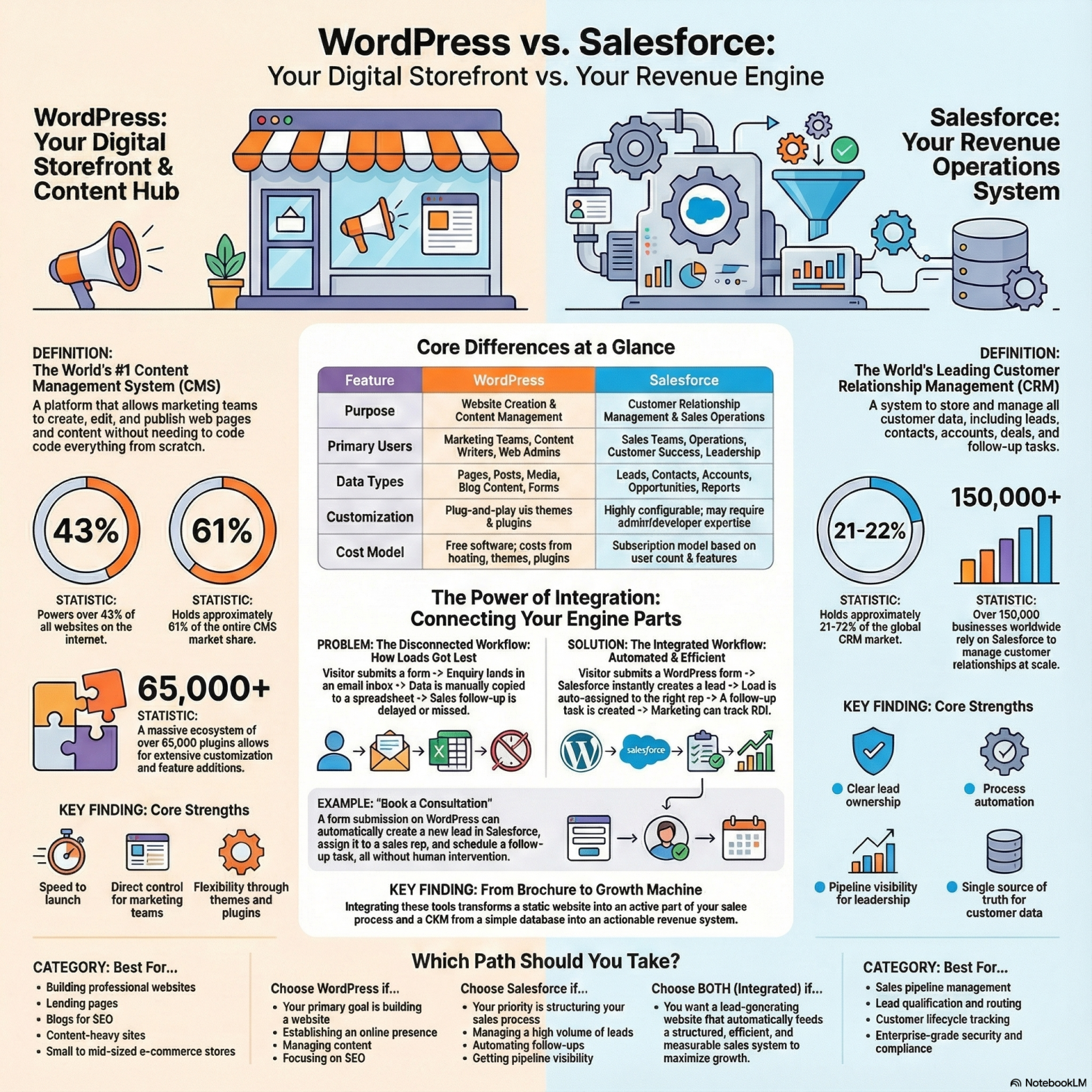
WordPress powers over 43% of all websites globally and controls roughly 61% of the CMS market. That dominance didn’t happen by accident. It happened because WordPress aligns closely with how marketing teams actually work.
Why businesses choose WordPress
WordPress continues to be the default choice because it delivers three enduring advantages:
- Speed to launch
Websites, landing pages, and campaigns can go live quickly using themes and page builders. - Marketing control
Content teams can publish blogs, update pages, and test messaging without waiting on developers. - Ecosystem scale
With 65,000+ plugins, most common needs—SEO, forms, analytics, e-commerce, performance—are already solved.
Where WordPress fits best
WordPress is ideal when your priority includes:
- A professional business website
- SEO and content-led growth
- Landing pages for lead generation
- Campaign microsites
- Content libraries (blogs, case studies, resources)
- Small to mid-sized e-commerce (via WooCommerce)
In simple terms:
WordPress is your digital storefront.
It is where people meet your brand, consume your message, and decide whether to engage.
What Salesforce Is—and Why It Runs Modern Customer Operations
Salesforce is often described as a CRM—but that description is no longer complete.
Salesforce is a customer platform made up of multiple specialized clouds that manage the full customer lifecycle.
Salesforce clouds at a glance
- Sales Cloud – leads, opportunities, pipelines, forecasting
- Service Cloud – customer support, cases, SLAs, omnichannel service
- Marketing Cloud – campaigns, journeys, personalization
- Commerce Cloud – enterprise-grade e-commerce and digital storefronts
- Experience Cloud – portals, partner sites, authenticated user experiences
Salesforce holds roughly 21–22% of the global CRM market, with over 150,000 businesses using it worldwide. Its strength lies in process, structure, and scale.
What Salesforce does exceptionally well
A well-implemented Salesforce environment provides:
- Clear ownership of leads and accounts
- Automated routing, scoring, and follow-ups
- Accurate pipeline and revenue reporting
- A single source of truth for customer data
- Audit trails, security, and compliance controls
In simple terms:
Salesforce is your revenue and customer operations system.
It ensures nothing slips through the cracks as your business grows.
An Important Clarification: Can Salesforce Replace a Website?
Salesforce can power commerce experiences and portals—especially through Commerce Cloud and Experience Cloud. Large enterprises sometimes build customer-facing systems directly on Salesforce infrastructure.
However, for most organizations, Salesforce is not a practical replacement for a traditional CMS-driven website.
Why?
- Content publishing requires technical expertise
- SEO-driven blogging is not native or intuitive
- Marketing teams lose agility
- Costs rise quickly for simple website changes
This is why even Salesforce-centric organizations often keep WordPress (or another CMS) as their public-facing website—while Salesforce runs the systems behind it.
Capability is not the same as suitability.
The Simplest Way to Understand the Difference
Think of your business like a well-run machine:
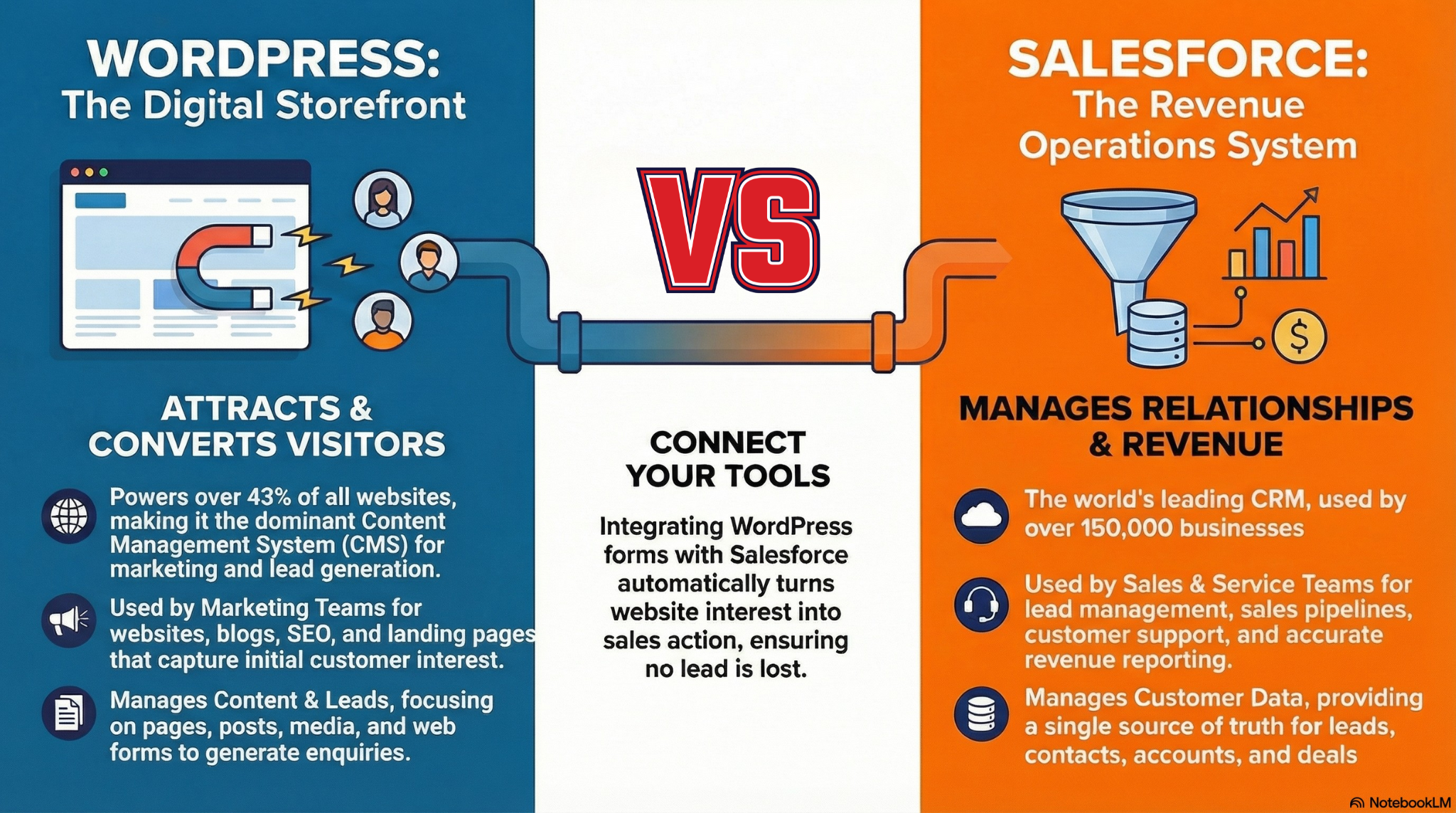
- WordPress attracts and converts visitors
- Salesforce manages relationships and revenue
If your website generates leads but nothing is tracked, you leak revenue.
If your CRM is powerful but your website is weak, you starve the system.
The real question is not which platform to choose—but how to connect them cleanly.
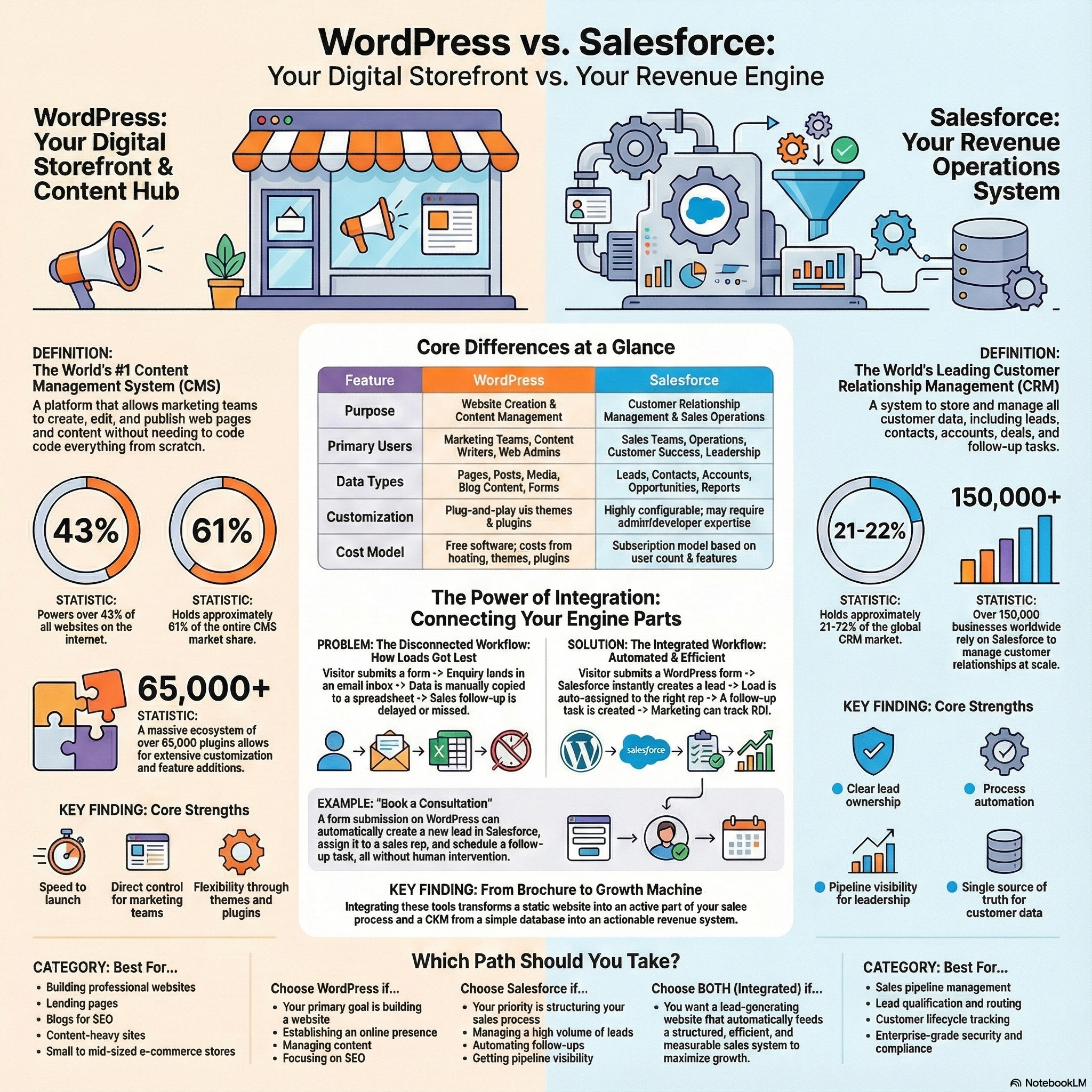
WordPress vs Salesforce: Core Differences That Matter
When One Platform Is Enough—and When It Isn’t
Scenario A: “We need a strong website and better SEO”
Start with WordPress. It gives you speed, flexibility, and content control.
Scenario B: “Leads are falling through the cracks”
You need Salesforce, properly configured—not just installed.
Scenario C: “Marketing generates enquiries, but sales can’t track outcomes”
This is where WordPress + Salesforce integration becomes essential.
Why WordPress + Salesforce Integration Delivers the Highest ROI
Most businesses don’t lose leads because they lack tools.
They lose leads because their tools are disconnected.
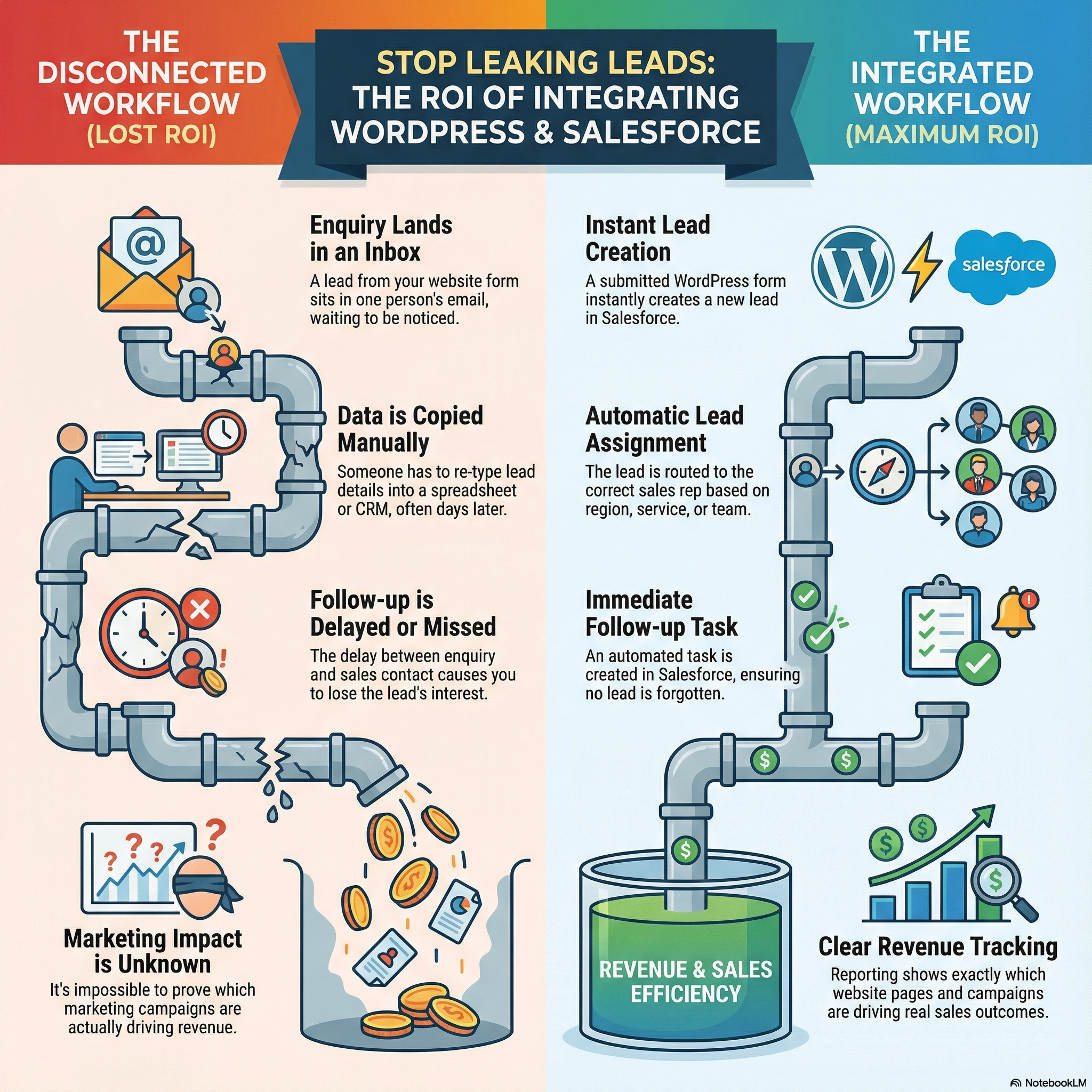
Without integration
- Website form → inbox
- Manual data entry (or none at all)
- Delayed follow-up
- No campaign attribution
With integration
- WordPress form → Salesforce lead instantly
- Automatic assignment and tasks
- Clean source tracking
- Real reporting on what drives revenue
That difference is not convenience.
It is sales efficiency and revenue protection.
Real-World Examples
Demo request
Form submission → Salesforce lead → assigned rep → follow-up task
Service enquiry
Landing page data → lead source + service interest stored in Salesforce
Multiple form types
Sales leads to sales pipeline
Job applications to HR
Partners to partner workflows
How WordPress–Salesforce Integration Is Typically Done
Common approaches include:
- Form-to-Salesforce plugins
- Salesforce Web-to-Lead
- No-code tools (Zapier, Make)
- Custom API integrations for complex needs
The right approach depends on volume, data structure, and sales processes.
For businesses that want a stable, scalable setup, Dotsquares provides a dedicated integration solution here:
https://wordpress.dotsquares.com/integrations/salesforce/
Final Decision Framework
Choose WordPress if your priority is:
- Website, content, SEO, lead capture
Choose Salesforce if your priority is:
- Lead management, automation, reporting
Choose both if your goal is:
- A connected growth system where marketing feeds sales automatically
Because a website without a CRM becomes a brochure.
And a CRM without a strong website becomes a database.
The strongest businesses have always been built on clear roles, clean systems, and reliable connections—and that principle still holds today.
Book a 30-minute Strategy Session with our Lead Salesforce Engineer. We will review your current infrastructure and outline a roadmap to integrate securely no sales pitch, just engineering strategy.

